Quote of the Month

When love and skill work together, expect a miracle. John Ruskin


Showing posts with label science. Show all posts

Wednesday, September 11, 2013

To Know, To Have Knowledge

Curiosity is a powerful word.  Wanting to know the what, who, why, when and where has been responsible for some amazing discoveries, inventions and understanding of otherwise unknowns.  It's mind-boggling to pause and wonder how different our world would be if not fueled by curiosity.


The American Association of School Librarians Best Websites for Teaching & Learning 2013 under the heading Content Resources, Standards for the 21st-Century Learner, 2.1.4 Use technology and other information tools to analyze and organize information, 2.4.4 Develop directions for future investigations and 3.1.2 Participate and collaborate as members of a social and intellectual network of learners selected a website which is a project of the Directorate for Education and Human Resources Programs of the American Association for the Advancement of Science, a part of Thinkfinity.  This website, Science NetLinks, is free to use, designed specifically for the K-12 educational community  and contains:

teaching tools, interactives, podcasts, and hands-on activities.

Across the top of the home page, a tool bar offers the following choices:


  • Books for the Science Classroom
  • Creating Classroom Rules
  • Spotlight on the Brain and
  • Curve Balls.
Moving left to right Books for the Science Classroom is a resource put together by Science Books & Films, a reviewing journal for the AAAS.  Only science trade books which have received a highly recommended rating are included.  This tool links to those reviews.  A blue launch tool button will take you to a new window so you may conduct a keyword search.

Beneath the launch tool button a drop-down box provides an explanation of other possible uses for the items listed in this resource.  In addition, it includes links to possible lessons using trade books.  Every time you access this page three different lessons will appear.  The possibilities are numerous.


Creating Classroom Rules is exactly what it says.  It is a very comprehensive lesson for setting the stage for learning.  It is divided into sections titled what you need, materials, purpose, context, planning ahead, motivation, development, assessment, extensions and related resources.

Spotlight on the Brain is part of a larger feature of the site.  Every day a sixty second podcast, Science Update, highlights news in science, technology or medicine.  This tool will take you to all those podcasts which, in some manner, have to do with the brain.  A transcript and the podcast are listed as choices.  As you can see below, more tie-ins to this tool are provided for educators.


The final option on the top toolbar, Curve Balls, is a sample of an individual Science Update page.  Following the podcast (1) and transcript (2) are several additional paragraphs for further discussion followed by possible questions to use.  As in the previous pages this contains a drop-down menu For Educators section.
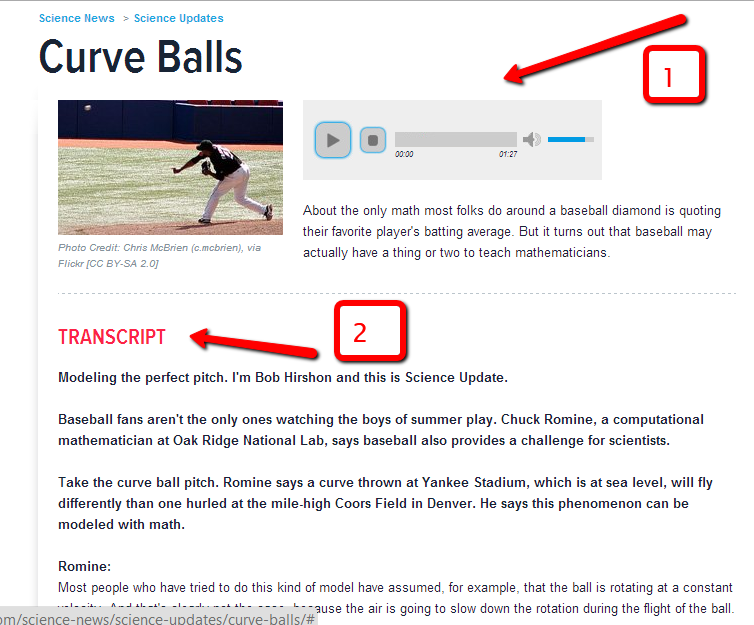

Not having visited this website over a long period of time I am not sure if the items on this top tool bar change or if they are examples permanently in place to give users an overview of the site.  Moving down the page there are more options.  These are lessons, tools, collections, afterschool and science news tabs plus a search box for lessons and tools K-12.  


When you select lessons or tools an advanced but user friendly search screen appears as pictured below.  Beneath this are the most popular lessons and the most recent lessons used.  (On the tools page the most popular tools are listed as well as an explanation of what tools are: hands-on activities, interactives, teaching aids or websites.) Under grades, themes and content you can click any number of the boxes you desire to refine or enlarge your search. 


For this search I choose fifth grade astronomy lessons (1).  On the left-hand side I can filter the results (2) by type and intended audience.  The resources are listed by title with appropriate grade levels for use (3).


The Collections lists about twenty special groupings per page (1).  An explanation of what constitutes a collection is given on the right-hand side (2).  Each collection list is broken down by the specific item such as lessons, tools, science updates, videos, and other resources.


Offering many hands-on science activities the Afterschool page is a more casual approach.  When you choose a specific title, there will be an option for educators and for students.  The educator option gives you materials, background, activity instructions, and related activities.  The student option gives you an activity sheet and online resources.


The final tab on the far right, Science News, is similar to the home page.  Predominantly shown are three major boxes featuring a rotation of resources, a Science Update and Today in Science. You can select the Science Updates box to see all of them.  If you choose Today in Science there is a calendar where any date in the year can be viewed.


Each time a lesson, tool, collection or after school title is selected on the right a small black box appears titled ______Details.  Here you will see grades, themes, and type.  Added to these might be project 2061 benchmarks or state standards.  If you desire by clicking on grades, themes or type, you are taken back to the advanced search box page. 


Science NetLinks is an impressive website.  As I explored hour after hour, I found myself continually fascinated by the information presented as well as the value it would provide to students, staff and parents in any school district.  Navigation of the site was extremely easy giving users multiple means to access to the variety of sources.  I can't imagine a science educator not using this site to enhance classroom instruction.


Wednesday, July 31, 2013

Waste Not...

With separate bins in every classroom for disposing of different kinds of waste, county centers or curbside recycling for home owners, compost bins in backyards, The Salvation Army, Goodwill and Habitat for Humanity stores in local communities, deposits on cans and bottles in many states and weekly garbage pick-up, it's hard to imagine a time when this was not commonplace.  Although forms of reuse have been around throughout history, the big push for recycling reemerged with the observance of the first Earth Day on April 22, 1970.  Shortly thereafter the science of studying trash and how it reflects on a given society, garbology, became a branch of the field of archaeology through the efforts of Professor William Rathje of the University of Arizona.

The American Association of School Librarians Best Websites for Teaching and Learning 2013 have included in their new list a website completely focused on this study.  Falling under the category of Curriculum Collaboration, Standards for the 21st-Century Learner1.3.4 Contribute to the exchange of ideas within a learning community, 3.1.2 Participate and collaborate as members of a social and intellectual network of learners, 3.1.4 Use technology and other information tools to organize and display knowledge and understanding in ways that others can view, use, and assess and 4.3.1 Participate in the social exchange of ideas, both electronically and in person this website is free to use and maintained with the support of sponsors by NatureBridge located in San Francisco, California.  Garbology is designed to be a resource for teachers, students and families.

When first accessing the home page users are greeted with an interactive game at the top of the page.  My Garbology defines the term by selecting the arrow on the left or the game can be started by choosing the arrow on the right.  The next screen features a row of colorful waste containers with items no longer needed by consumers.


Users have the option of dragging the items into the Reuse, Compost, Recycle or Landfill bins.  If, for example, the shirt is placed in the Compost can, it spits it back out again.  That is the incorrect way of disposing of used clothing.


If it is correctly placed in the Reuse container, a new window opens.  At this window a fact is provided for the person playing the game.  They can continue to learn more information by clicking on the next button [1], go back to the original screen with the row of containers [2] or shrink the size of the game window by choosing the box with the arrow in it [3].


When all of the facts have been explained, listened to by the user, a challenge pops up on the screen.  At this point by choosing the next arrow, you are taken back to the original screen with the item correctly placed in the container no longer available. When all of the items have been placed in the preferred container, a final window appears.


In this window users are asked to take the pledge.  You can download a printable PDF document and take the pledge on Facebook.  If you want to go through the game again, that option is also available.  There are numerous interactive choices within each portion of the game, looking at objects through x-ray glasses, moving a slider and dragging and dropping items to a scale, for example.


Beneath the game is a toolbar with choices for learning more about what the site offers, a page dedicated to listing the sources of information for the facts given in the game, links to pages geared toward teachers, students and families, Trash Talk (a page explaining Garbology as a term, its history, and the site) and a contact submission form.
When choosing any of these options, across the top of the new page users can gain more information about services offered by NatureBridge in California.  The tabs are:


  • About Us (Why We Teach, How We Teach, Research & Resources)
  • School & Group Field Science (at Yosemite, at Golden Gate, at Olympic, at Santa Monica Mountains, at Channel Islands)
  • Family & Youth Programs (at Yosemite, at Golden Gate, at Olympic)
  • Training & Tools (for Teachers, for Outdoor Professionals)
  • National Park Locations (Yosemite, Golden Gate, Olympic, Santa Monica Mountains, Channel Islands) and
  • News, Events & Community (News & Events, Blog, Media)

On the For Teachers page all the lessons (nine) and fact sheets (five) are in PDF format.  Each lesson includes the appropriate grade level, a summary, overview, vocabulary, materials, time needed, background introduction, a lengthy list of activities, National Science Standards covered in the lesson and any necessary activity sheets.  If any preparations are needed they are listed.  Some lessons include before and after questions to promote discussion and extensions to the listed activities. 


The For Students section provides activities (eight) geared toward conducting your own garbology.  Seven activities are included in the For Parents page.  Each of the three For pages contains a featured item as well as a link to the My Garbology game.


Due to the interactivity of the My Garbology game this website could be used by individuals or with groups.  Each layer of the game cleverly informs the player(s) but also encourages independent thinking and larger conversations.  The facts provided are astounding no matter the age of the user.  No one can use this website without wondering what they can do to make our planet better for future generations.

Make sure you place this top-notch website in your curriculum.  It's a must; highly recommended. There is also an option to sign up for teaching resources via email.  


Tuesday, November 8, 2011

Let's Go Exploring

Using Exploratorium, the museum of science, art and human perception, is an experience that could consume hours.  Where else can you discover how to make a battery using your hands, explore how to make a virtual skull, how to tie the six best knots to use on a voyaging canoe, listen to different frog sounds and make a frog chorus, or learn how to make a light painting.  It's one stop shopping for coolness.

Exploratorium was selected in 2011 by the AASL to appear on their Top 25 Websites for Teaching and Learning.  It falls under the Content Resources:  Lesson Plans and More, Standards for 21st Century Learners, 2.1.4 Use technology and other information tools to analyze and organize information, 2.4.4 Develop directions for future investigations, and 3.1.2 Participate and collaborate as members of a social and intellectual network of learners.

At the site's home page users are invited by a selection of tabs at the top to peruse the pages according to their status, Who Are You?; educators, parents, artists, teens, museum professionals, scientist, geeks or just plain curious.

When the Explore tab is chosen the following categories appear:  astronomy and space, culture, Earth, everyday science, human body, listening, living things, material world, mind and seeing.  Within each category are thumbnail visuals when moused over give a brief description of what is offered. 

Location and directions, hours and administration, plan your visit, calendar, Tactile Dome, school field trips and groups and parties are options available under the Visit tab.

Under the Membership tab users learn about levels and benefits, how to join on the spot, birthday parties, events, programs, day camps, the homeschool program and frequently asked questions.

By clicking on the About tab readers can better understand the museum's mission which is partial stated below:

The Exploratorium is a museum of science, art, and human perception located in San Francisco, California. We believe that following your curiosity and asking questions can lead to amazing moments of discovery, learning, and awareness, and can increase confidence in your ability to understand how the world works. We also believe that being playful and having fun is an important part of the process for people of all ages.


We create tools and experiences that help you to become an active explorer: hundreds of explore-for-yourself exhibits; a Web site with over 25,000 pages of content; film screenings; workshops for lifelong learners ...

Each year I do a unit with our third grade students building on the Caldecott award winning book, Snowflake Bentley written by Jacqueline Briggs Martin and illustrated by Mary Azarian.  Using the site search box typing in snowflakes, I was rewarded with a plethora of resources; 1,040 to be exact.  To narrow your search on the right hand side are other keyword phrases to use. 
Exploratorium is an outstanding resource for professional and personal discovery.  It's a way of bringing the museum right into your own room.