A single word can be very powerful; a carefully chosen group of words even more so. Spoken or written they can change thinking, relationships or the course of history. They can't be erased once they have been released.
Word clouds have become a visual expression, a more artistic display, of word arrangement. Wordlewas one of the first generators I used. I enjoyed experimenting with Wordlings and Tagxedo for this post.
Word It Out is an application that offers the ability to create, explore other created word clouds or participate with other members of the Word It Out community by using the blog, checking out the FAQ section, read how others are using Word It Out, make suggestions and point out problems. It is free to users who are 13 years of age or older. To begin enter in text at the home page.
As you type spelling errors are underlined in red. When all the text has been entered, click the green Word it out! button. At the next screen your cloud will appear.
At that point with a single click you can alter the look of the word cloud with a new random selection (Random settings), realign the center of the words (Set target) or redraw the word cloud with the settings already in place (Redraw). By scrolling down beneath your word cloud you can manually customize the look of your creation (word cloud) altering the colours, text, size and layout. Word list settings and how the text is analyzed(words/punctuation characters to leave in or take out) can be changed also.
When you are satisfied click the Save button. The next screen asks you to enter in a title, short description of your word cloud, a related web page, the sharing options of public (everyone) or private (only for those with the link you provide) and your email address. An email is sent immediately with a link to confirm your address and to provide you with a secret link to the word cloud.
Your word cloud can be posted on numerous social networks, emailed, printed, downloaded to your computer as an image or embedded using HTML into a website or blog.
I really like all the features of Word It Out. It can be as simple as using the random selection or modified manually by using all the extra controls available. Here is my Word It Out for Favorite First Lines.
Two new word cloud generators just came to my attention via Larry Ferlazzo's Web Sites of the Day. Wordlings is the newer of the two. There appears to be no sign up requirements. You can log in using your Facebook or Twitter account. Clouds can be created from a website or by copying and pasting text which I accomplished by erasing a web site word list and pasting in my own words. I was able to also type in additional words to my original text. Once the words are arranged the user can rearrange them, pause the arrangement, take a screenshot or an HD screenshot, save it privately to social sites or a blog, publish it in the gallery or delete it. There are seventeen fonts to choose from as well as making it small, medium or large in size. The words can be aligned, horizontal or jumbled. The text can be black, white or colored. An image can be uploaded from your computer or thirteen other shapes can be selected. It is clearly not as sophisticated as the cloud generator that follows. I could not get the Take Screenshot option to work and had to right mouse click to get this image. When the Embed in Your Blog code was used the image appears as about half the size as the web page which looks gigantic on a blog post. Clearly I need to spend some more time working with this app but then again it is brand new. It only works with certain browsers. I needed to use Mozilla Firefox instead of Internet Explorer.
Just a little over a year ago, Hardy Leung created a word cloud generator that rivals Wordle. Tagxedo takes making word clouds to an art form. At the first screen users can begin simply by selecting to enter in a web site URL, Twitter ID, Del.icio.us ID, a News event, Search term or lookup a RSS feed. Five shapes are offered; classic, apple, dove, heart or star. Orientation can be free style, horizontal, vertical or horizontal and vertical. There is a choice of seventeen fonts and twenty color themes. After submitting your choices the cloud will be made. From the next screen alterations can be made with just a click changing color, theme, font, orientation, and layout. There are more than 100 new shapes from which to choose.
A history of all changes the user makes is available in case an earlier design is preferable. There are layout options worthy of a graphic designer. Images can be saved in a variety of sizes and forms. It can also be printed.
If the user so desires at this screen words can be loaded from a file, web page or by typing in text.
Final creation saved as a tagxedo.jpg made by entering in National Poetry Month in the News option at the first screen
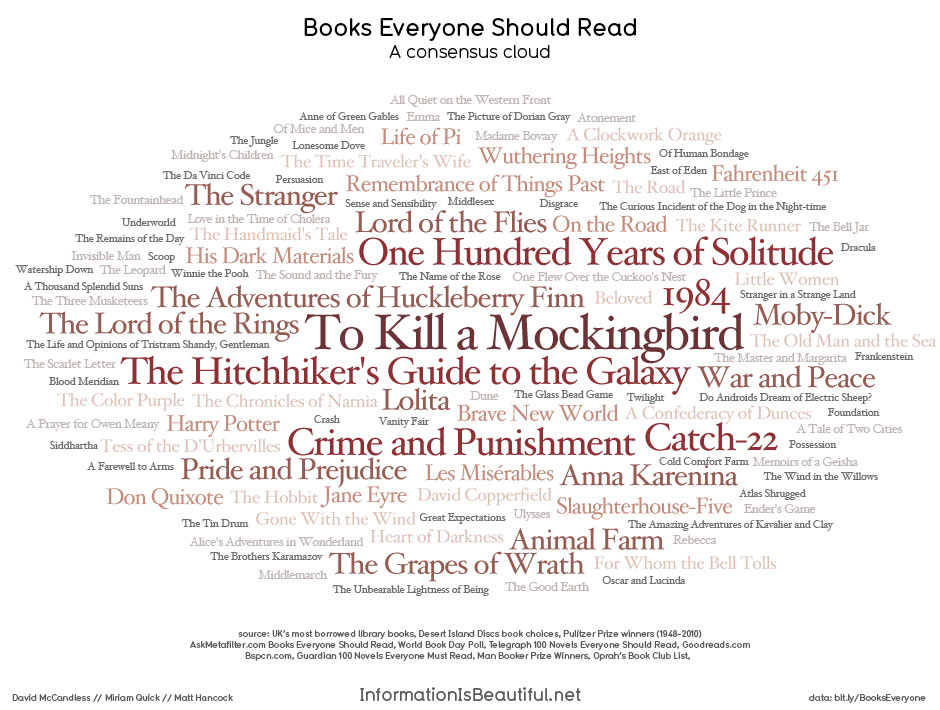
Yesterday Larry Ferlazzo's Web Sites of theDay highlighted an interesting infograhic word cloud. It was posted at the Guardian out of the United Kingdom. This word cloud used numerous sources to generate this must read list. Check it out.. I am thinking that it might be beneficial in our classrooms to create a similar cloud of books everyone must read. It would be interesting to see how it changes across the grade levels.
Considering that two of my lifetime passions are gardening and books using words as flowers in
AnswerGarden is the perfect mix. AnswerGarden is an online tool that is free with no login required. Very simply it is a visual interactive space where answers are placed in response to a question or statement. A growing word cloud is generated by all the users. This word cloud can be imported into Wordle if you wish to print a hard copy.